The 2026 Enterprise AI Stack I'd Use If Starting From Scratch Today
2026-05-27 • Generative-AI,Predictive-AI,AI,MCP,AWS • Sam Madireddy
If someone handed me a greenfield AI project and a fresh cloud account today, I would not start by asking which LLM to use. That is the wrong first question.
I would ask: what does this architecture look like at 10x the load, 10x the cost, and six months after the team that built it has moved on?
I have been building and productionizing AI systems on AWS as a Technical Lead. I have watched teams pick tools based on hype, ship fast, and then spend months firefighting in production. This post is the stack I would choose today, grounded in what I have seen work in production, not in benchmarks or blog hype. The principles apply across cloud providers. The examples lean AWS because that is where my hands-on experience lives.
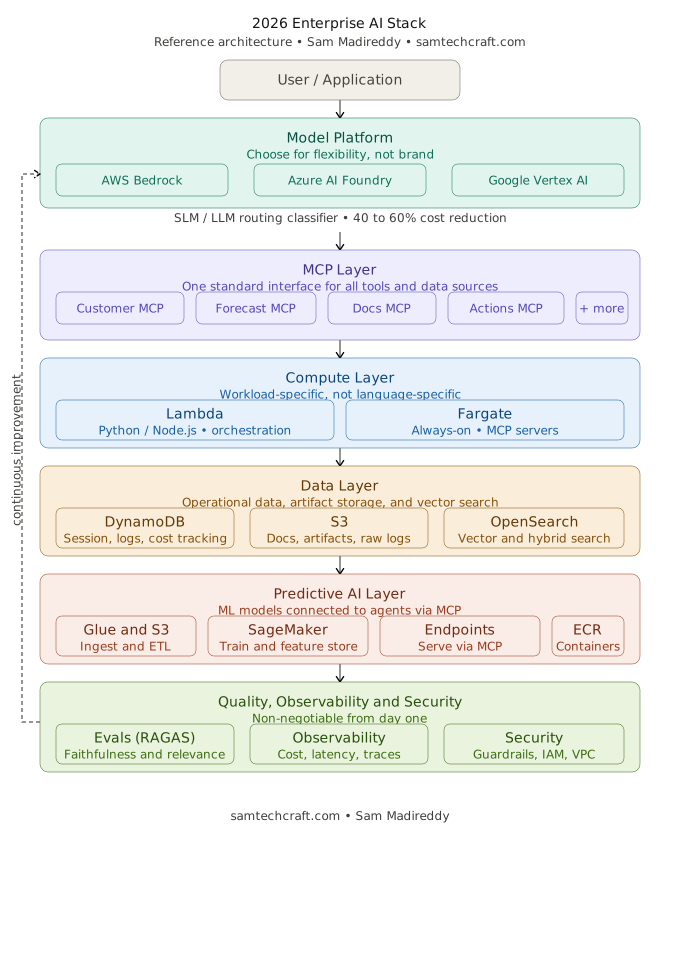
The teams winning with AI right now are not chasing the latest model. They are investing in the infrastructure layer that makes every model smarter.
In this article we'll walk through:
👉 The model layer: choosing across cloud providers, and why flexibility beats commitment
👉 The MCP layer: why it changes everything about tool integration
👉 The compute layer: Lambda versus Fargate for AI workloads
👉 The operational data layer: DynamoDB and S3 with AI-specific patterns
👉 The vector store layer: options, tradeoffs, and why hybrid search wins
👉 The SLM vs LLM routing decision that cuts costs dramatically
👉 Where predictive AI fits: SageMaker, Glue, and connecting ML models to agents
👉 Evaluating LLM and RAG quality in production
👉 The observability and security layers
👉 AI-specific pitfalls to avoid
👉 Reference architecture table for 2026
This post focuses on two AI disciplines that deliver the most enterprise value when combined: Generative AI, covering large language models, agents, RAG pipelines, and MCP-based tool systems, and Predictive AI, covering forecasting, classification, and anomaly detection models. Other AI disciplines exist and are production-ready, but those two are where this post stays.
1. The Model Layer: Choose for Flexibility, Not Brand
The first decision is not which model to use. It is where to run your models and how to avoid being locked in.
All three major clouds have mature managed AI inference platforms today. Azure AI Foundry is strong for organizations already running on Microsoft infrastructure, with tight Azure Active Directory integration and enterprise support contracts. Google Vertex AI gives access to Gemini models and integrates well with BigQuery for data-heavy workloads. AWS Bedrock has consistently delivered proven results for enterprises running on AWS. It offers the broadest model selection from multiple providers including Anthropic, Meta, Mistral, and Amazon, with IAM-native security, VPC support, and Guardrails all in one managed service.
Whichever platform your organization runs on, the criteria for selecting individual models remain the same:
- For reasoning-heavy tasks such as multi-step agent decisions, document analysis, and complex summarization: prioritize strong instruction-following, large context window, and low hallucination rate. Several frontier models across all three platforms meet this bar today.
- For high-volume, low-complexity tasks such as classification, intent detection, and extraction: choose the cheapest model that meets your accuracy threshold. The cost difference versus a frontier model compounds quickly at scale.
- Always configure a fallback model, ideally from a different provider. Provider outages happen. Design for that from day one.
🎯 Why this matters for tech leaders: The model landscape moves faster than deployment cycles. The best choice today may not be the best choice in six months. Choose a platform that lets you swap models without re-architecting.
2. The MCP Layer: The Missing Piece That Changes Everything
If there is one architectural decision that separates modern AI systems from the previous generation, it is whether agents use the Model Context Protocol or not.
Before MCP, connecting an agent to a database, an API, or a prediction model meant writing a custom integration for each one. Five tools meant five integrations. Ten tools meant ten integrations, each one different, each one brittle, each one owned by whoever happened to write it. When that person left the team, the integration became a liability.
MCP standardizes that entire layer. It defines a common interface for how agents discover tools, call them, and interpret their responses. Think of it as the USB standard for AI. Instead of every device needing a different cable, every tool speaks the same protocol. An agent does not need to know whether it is calling a database, a forecasting model, or an internal API. It calls them all the same way.
In a well-structured 2026 stack, every major capability is wrapped as an MCP server. Customer data, prediction models, document retrieval, inventory systems, and action triggers all expose themselves through MCP. When you need to add a sixth capability, you add one MCP server. The agent does not change at all.
What MCP Enables at the Team Level
Beyond the technical benefits, MCP changes how teams work. Different teams can own and evolve their MCP servers independently. The team managing the forecasting model can update it without coordinating with the team building the agent. The security team can add input validation to MCP servers in one place rather than hunting through agent code. Composability becomes real, not just a slide in a presentation.
🎯 Why this matters for tech leaders: MCP turns your AI architecture from a web of custom integrations into a composable system where teams build independently and agents stay stable. That is the architecture that scales with an organization.
// Node.js MCP server wrapping a DynamoDB customer table
server.defineTool({
  name: "get_customer",
  description: "Retrieve customer profile by ID",
  parameters: { customerId: { type: "string" } },
  handler: async ({ customerId }) => {
    const result = await dynamo.send(new GetItemCommand({
      TableName: process.env.CUSTOMER_TABLE,
      Key: { customerId: { S: customerId } }
    }));
    return result.Item || null;
  }
});

// Agent calling three different MCP servers through one uniform interface
const customer  = await mcpCall("customer-mcp",  "get_customer", { customerId });
const forecast  = await mcpCall("forecast-mcp",  "get_forecast", { skuId });
const documents = await mcpCall("documents-mcp", "search",       { query });

// Agent reasons over combined results and decides what to do next
const decision  = await invokeModel(buildPrompt(customer, forecast, documents));
3. The Compute Layer: Lambda vs Fargate for AI Workloads
This is the question I get asked most often. The answer is workload-specific, not a language recommendation and not a blanket preference for one over the other.
Python and Node.js on Lambda are the standard and proven pattern for AI orchestration workloads. Agent reasoning loops, API handlers, model routing classifiers, and event-driven tasks all run well on Lambda with these runtimes. Cold starts are short, the runtimes are lightweight, and the serverless model fits the bursty nature of most AI request patterns. This is what most production AI teams are running today, and it is the right call for those workloads.
Fargate becomes the right answer when the workload does not fit Lambda's model, regardless of language:
| Use Lambda for | Use Fargate for |
|---|---|
| Agent orchestration (Python or Node.js) | MCP servers needing persistent warmth |
| API handlers and request routing | Inference endpoints with strict latency SLAs |
| Model routing classifiers | Long-running batch inference jobs |
| Event-driven tasks under 15 minutes | Workloads where Lambda cold starts are unacceptable |
🎯 Why this matters for tech leaders: The decision between Lambda and Fargate is about workload characteristics, not language preference. Python and Node.js work well on both. Use Lambda for orchestration and event-driven work. Use Fargate when you need always-on availability or persistent state.
4. The Operational Data Layer: DynamoDB and S3
Two services cover the operational data needs of almost every AI system I have built. The key is knowing which workloads belong in each.
DynamoDB for Real-Time AI Data
- Session state and conversation history: store agent context per user session with a TTL attribute so records expire automatically. No manual cleanup needed.
- Agent decision logs: every decision an agent makes, which MCP servers it called, what they returned, and what action it took. This is your audit trail and your debugging surface.
- Per-request cost tracking: model name, token count, and estimated cost per invocation. At scale this data tells you exactly where your spend is going.
- DynamoDB Streams: trigger downstream Lambda functions automatically when an agent writes a decision. Useful for notifications, analytics, and secondary processing without polling.
S3 for Everything Else
- Document storage for RAG: raw documents, chunked versions, and embedding metadata all live in S3 before being indexed into your vector store.
- Training data and model artifacts: organized by model version and date so SageMaker training jobs and Glue pipelines can reference them reliably.
- Raw event logs: full request and response payloads archived for compliance, retraining, and retrospective analysis.
- Lifecycle policies: automatically tier old training data and logs to cheaper storage classes over time. AI workloads generate significant data volume and storage costs add up without lifecycle management.
🎯 Why this matters for tech leaders: DynamoDB handles what needs to be fast and queryable. S3 handles everything that needs to be stored reliably and cheaply. Keeping that boundary clean prevents the architecture from sprawling into unnecessary services.
5. The Vector Store Layer: Options, Tradeoffs, and Why Hybrid Search Wins
The vector store is a distinct layer from operational data. Its purpose is fundamentally different: enabling your AI system to find relevant information by meaning, not just by exact match. For RAG pipelines and semantic search, this layer is non-negotiable.
OpenSearch Serverless
This is the option I reach for on AWS-centric stacks. It supports both vector search and full-text keyword search in a single service, scales automatically, and removes the operational burden of managing clusters and shards. Hybrid search, combining semantic and keyword approaches using Reciprocal Rank Fusion, consistently outperforms either approach alone for enterprise document retrieval.
- Vector search finds documents by semantic similarity using embeddings. It works well for conceptual and intent-based queries.
- Keyword search finds documents by exact or near-exact term matching. It works well for product names, IDs, and precise terminology.
- Hybrid search combines both approaches and delivers the best overall retrieval quality for most enterprise use cases.
Other Viable Options
Pinecone is the most widely recognized standalone vector database and is worth knowing about regardless of which cloud you are on. It is fully managed, developer-friendly, and integrates cleanly with AWS, Azure, Google Cloud, or any other infrastructure. Teams that want a purpose-built vector database without tying it to a specific cloud provider often reach for Pinecone. The tradeoff is an additional vendor dependency outside your primary cloud, but for teams that value that flexibility it is a strong choice.
Amazon Kendra offers pre-built connectors to enterprise sources like SharePoint, Salesforce, and S3, which can accelerate time to value for document search use cases. The cost premium is significant and should be evaluated carefully before committing.
🎯 Why this matters for tech leaders: Pick the vector store that fits your infrastructure commitment and cost tolerance. Hybrid search capability should be a baseline requirement regardless of which option you choose.
6. The SLM vs LLM Routing Decision That Cuts Costs Dramatically
Not every query needs your most capable model. A lightweight classifier that routes queries to the right model tier can cut inference costs by 40 to 60 percent without users noticing any quality difference.
Small Language Models have caught up significantly on narrow tasks. Classification, intent detection, extraction, and short-content summarization are all tasks where a well-chosen SLM delivers comparable accuracy to a frontier LLM at a fraction of the cost. The routing logic itself is simple: classify the query before sending it anywhere, and let the classification determine which model tier handles it.
// Model router: classify before you invoke
async function routeQuery(query) {
  const classification = await invokeModel(
    `Classify as SIMPLE or COMPLEX: "${query}"
     SIMPLE: greetings, factual lookups, yes/no, single-step tasks.
     COMPLEX: multi-step reasoning, document analysis, nuanced decisions.
     Respond with only SIMPLE or COMPLEX.`,
    LIGHTWEIGHT_MODEL_ID   // cheapest available model for routing
  );
  return classification.trim() === "SIMPLE"
    ? { model: LIGHTWEIGHT_MODEL_ID, tier: "low-cost"       }
    : { model: FRONTIER_MODEL_ID,    tier: "full-capability" };
}
🎯 Why this matters for tech leaders: Build this from day one, not after the first surprising cloud bill. At high request volumes the savings are material enough to fund engineering headcount.
7. Where Predictive AI Fits: Connecting ML Models to Your Agents
Generative AI gets the attention, but predictive AI covers forecasting, classification, anomaly detection, and scoring models, and it is still where a large share of enterprise AI value lives. The most powerful systems combine both.
The key insight is that generative agents make better decisions when they have access to predictions. An agent that calls a demand forecast or an anomaly detector before reasoning over what to do next is fundamentally more capable than one relying on language alone. MCP makes this connection clean. Serving endpoints become MCP servers, and agents call them like any other tool.
The Predictive AI Stack on AWS
- Data ingestion: raw data flows into S3 via Kafka for streaming or batch uploads. AWS Glue handles ETL, cleaning, transforming, and preparing features.
- Feature engineering: SageMaker Feature Store holds computed features in a versioned, reusable way across multiple models.
- Model training: SageMaker Training Jobs run workloads on managed compute. Artifacts go to S3. Custom container images live in ECR.
- Model serving: SageMaker Endpoints are one well-established option for real-time inference. Containerized APIs on Fargate are another depending on latency and cost requirements.
- Connecting to agents: wrap each serving endpoint as an MCP server. Agents call predictions through the same MCP interface as every other tool.
🎯 Why this matters for tech leaders: ML models sitting in production today are often underutilized. Wrapping them as MCP servers and connecting them to generative agents is one of the highest-ROI architectural moves available right now.
8. Evaluating LLM and RAG Quality in Production
With a traditional ML model, you have a loss function and test accuracy to tell you whether things are working. With an LLM or a RAG pipeline, you have none of that automatically. You have to define what good looks like and measure it deliberately.
For RAG systems specifically, evaluation covers three things: did the retrieval surface the right documents from the vector store, did the LLM reason faithfully over those documents, and did the final response actually answer the question. None of these are measured by standard API monitoring.
A Practical Eval Setup
The most common mistake is treating evals as an academic exercise requiring months of framework-building before shipping anything. The practical version is much simpler and should go in on day one:
- Define what a good response looks like for your top ten query types.
- Build a small golden dataset of representative queries with expected outputs.
- Run a comparison every time you change a model, a prompt, or a retrieval setting.
- Track three metrics: answer faithfulness (did the LLM stay true to the retrieved context), context relevance (did retrieval surface the right documents), and answer relevance (did the response address what was asked).
RAGAS is an open-source evaluation framework built specifically for RAG pipelines. It automates the measurement of those three metrics against your golden dataset and makes it straightforward to catch regressions before users do.
🎯 Why this matters for tech leaders: Any team shipping an LLM or RAG feature needs a basic eval loop. Without one, you are flying blind every time you change a model or a prompt.
9. The Observability Layer: Four Things to Instrument From Day One
AI systems fail in ways that standard request and response metrics do not capture.
- Per-request cost tracking: every invocation logs its model, token count, and estimated cost. You cannot manage what you do not measure.
- Decision tracing: every agent decision logs what MCP servers were called, what they returned, and what action was taken.
- Model response quality sampling: log a sample of responses with their inputs and run a daily evaluation. Alert if quality degrades.
- Latency by model and path: track p50, p95, and p99 separately per model and per agent path. Outliers in production are almost always on one specific path.
🎯 Why this matters for tech leaders: Build observability before you need it, not after the first production incident you cannot explain.
10. The Security Layer: Non-Negotiable From Day One
Prompt injection, data leakage through model responses, and over-permissioned access roles are the three most common failure modes in production AI systems.
- Model guardrails: filter inputs and outputs. Block PII and credentials from appearing in model responses. Most managed platforms offer this. Two hours of setup prevents a category of incidents.
- Least-privilege access per service: every compute resource gets its own role or service account with exactly the permissions it needs and nothing more.
- Network isolation for sensitive workloads: if your AI system touches regulated data, run it inside a private network. MCP servers should communicate over private endpoints, not the public internet.
- Input validation before the model: never pass raw user input directly to a model. Always sanitize, length-check, and validate intent first.
🎯 Why this matters for tech leaders: A single prompt injection or PII leakage event can end an AI program. These controls are not expensive to implement. The absence of them is.
11. AI-Specific Pitfalls Worth Calling Out
These are patterns that look reasonable early on but create real problems in production AI systems.
Treating prompts as static artifacts. Prompts are code. They should be versioned, tested, and deployed the same way code is. A prompt change in production with no tracking is a silent deployment that can degrade your entire system overnight.
Skipping the routing layer. Sending every request to your most capable model is the fastest way to make an AI feature economically unviable at scale. Build the classifier early.
Building agents without a fallback path. Agents fail. Models time out. MCP servers go down. Every agent flow needs a graceful degradation path that does not leave the user with a blank screen.
No eval loop before go-live. Shipping an LLM feature with no evaluation baseline means you have no way to know whether future changes helped or hurt. A small golden dataset takes one day to build and pays back immediately.
Single model provider dependency. No exceptions. Provider outages happen across all major platforms. Build a fallback from day one.
Over-engineering the agent framework. Heavy orchestration frameworks add abstraction that feels helpful in prototyping and painful in production debugging. A thin agent loop you own is easier to maintain and easier to fix when things go wrong.
12. Reference Architecture: 2026 Enterprise AI Stack
This is a reference, not a prescription. The right choices depend on your cloud provider, team skills, and cost constraints.
| Layer | Service / Tool | Notes |
|---|---|---|
| Model Platform | AWS Bedrock (multi-model) | Flexibility, IAM-native, VPC, Guardrails |
| Model Alternatives | Azure AI Foundry / Vertex AI | Valid for non-AWS teams, same criteria apply |
| Tool Integration | MCP Servers | Composable, reusable, cloud-agnostic standard |
| Agent Orchestration | Lambda (Python or Node.js) | Event-driven, serverless, proven at scale |
| Inference Workloads | Fargate or equivalent | Always-on serving, no cold start constraints |
| Operational Data | DynamoDB | Session state, agent logs, cost tracking |
| Document and Artifact Storage | S3 or equivalent object store | RAG docs, training data, model artifacts |
| Vector Store (primary) | OpenSearch Serverless | Hybrid search, auto-scaling, AWS-native |
| Vector Store (alternative) | Pinecone | Fully managed, cloud-agnostic, developer-friendly |
| Model Routing | Lightweight SLM classifier | 40-60% inference cost reduction |
| Predictive AI Training | SageMaker + Glue + ECR | End-to-end ML pipeline on AWS |
| Predictive AI Serving | SageMaker Endpoints or Fargate APIs | Choose based on latency and cost requirements |
| Evaluation | RAGAS or custom golden dataset | Faithfulness, context relevance, answer relevance |
| Observability | CloudWatch + structured logs | Per-request cost and decision tracing |
| Security | Model guardrails + least-privilege IAM | Input/output filtering, private networking |
13. The Three Decisions That Matter Most
Out of everything above, if I could only get three things right from day one, these would be them.
👉 Use MCP from day one. Hardcoding tool calls ships faster and becomes a maintenance nightmare at scale. MCP adds two days of setup and saves months of refactoring.
👉 Build the routing layer before you need it. At low traffic, sending everything to your frontier model seems fine. At high volume, you will wish you had built the classifier from the start.
👉 Connect your predictive models to your agents early. If serving endpoints are already running in production, wrap them as MCP servers now. The compounding value of agents that can predict before they act is significant.
The teams that win with AI are not the ones with the most sophisticated models. They are the ones that built the right foundation underneath.
If you are leading an AI initiative and want to pressure-test your architecture choices, feel free to reach out.
Sam Madireddy
Connect with me on LinkedIn